TweakWare VPN - Use MTN BBLITE, Etisalat Social Pak and 2go 3GB Data Easily on Android

We've seen a gradual transition from the era of imei tweaking to the era of using Virtual Private Networks (VPN) over the months in other to enjoy relatively cheap/free internet access on our smartphone.

Different VPN apps like SimpleAndroidServer, PsiphonHandler, OpenVPN and more came to the rescue and each had it own uniqueness despite the fact that they all work for the same purpose.

Due to the little configurations/settings involved in setting up each of these VPN apps, a lot of lazy people have been ranting about and most don't seem to get it right.

Tweakware VPN has come to save you the hassles of proxies, ports, and injection bla bla bla as it comes pre-configured with settings for the MTN Unlimited #70 Daily plan and Etisalat Social pak with #50. All you need to do is to make the right selections and you should be up an running in a matter of a few minutes.

How to Set-up TweakWare VPN to work with MTN BBLITE Unlimited Plan or Etisalat Social pak

  • Subscribe to the BBLITE plan of your choice; *216*7# for daily plan @ #70, *216*8# for weekly plan @ #350 or *216*9# for monthly plan @ #1000
OR
  • Subscribe to Etisalat Chat pak with *200*3*3*1*1# @ #50 or *200*3*3*2*1*1# for the Social pak @ #100 only.
  • Download and Install tweakware VPN from HERE | 700kb
  • Lauch tweakware VPN and tap on the options button located at the top right corner of your screen
  • Select settings from the screen and tap on Bundled Settings


  • Tick the "Use Bundled Settings" options and select MTN BIS 1 or Etisalat Chat Pack under the "Select Bundle Option"
  • Go back a step and click on Network Settings
  • Then tick Enable keep alive under Connection Settings
  • Set keep alive interval and keep alive timeout to 5
  • Go back to the home page and click connect! Then wait a few seconds and Voila!

How to Set-up tweakware VPN for 2go 3GB data

  • Download and Install Tweakware VPN from HERE | 700kb
  • Launch tweakware VPN and select settings from the option menu
  • Go to Network settings
  • Check the Connect via HTTP Proxy box under Proxy Settings
  • Proxy host: 10.199.212.2
  • Port: 8080

  • Check Enable Proxy Tweaks box
  • Open Proxy Tweaks Menu and set as below;
  1. ♦ tick Apply Injection Query box
  2. injection full URL: http://wap.2go.im/home.php
  3. injection host: wap.2go.im
  4. Injection line break: rn:4
  5. ♦ Go back and connect!
After you must have click on connect, Wait a few seconds for handshake and authentication to be successful and you should be connected not long afterwards.

MTN BBLITED 5GB Plan For Android Using Psiphon Handler

Well, I must start with the fact that, it's not a new plan or ideology as thousands, if not millions of Nigerians already make use of this plan on their Android devices.

And the main reason Why I decided to finally put up the post is to respond to the tons of messages I get in my mail daily from subscribers Who have been finding it difficult to have access to cheap internet on their Android devices.
Psiphon handler
Psiphon Handler at work
In this post, you will be learning how to enjoy up to 5GB of data daily  on your Android device for a price of #50 only.

Requirements

  • Android 4.0+ device (devices below 4.0+ requires Root access)
  • Psiphon Handler | Download here
  • A registered MTN Sim.

Procedures

==> Firstly, you'll have to subscribe to the Blackberry BBLITED plan of your choice.
  • dial *216*7# for daily plan at #70 (Recommended)
  • dial *216*8# for weekly plan at #350
  • dial *216*9# for monthly plan at #1,000

==> After subscribing, download and install Psiphon Handler from the link above.

==> Launch your Psiphon Handler and configure as follows.

  • Proxy type: select Real Host
  • Proxy Server: web.blackberry.com
  • Real Proxy type: Select HTTP
  • Real Proxy Server: 10.199.212.2
  • Real Proxy Host: 8080
Psiphon handler setup
Psiphon Handler Settings 
==> Click save and you'll get a pop-up asking if you want to tunnel whole device.

==> Select 'Tunnel whole device" and you may get another pop-up asking if you trust the application; Grant it!

==> you'll be presented with another menu; select Options tab on this menu.

==> under options tab, select United states as your region and click on 'More option'.

==> Under more options; check the 'Connect through an HTTP' box and another set of option will become available.

==> Now, click on 'use the following settings' and input 10.199.212.2 as host Address and 8080 as port

==> Hit the back button and click on start to keep on blazing at the speed of sound. 😁


Must Read: NCCs New Sim Replacement Regulations [Now Tightened]

The Nigerian Communication Commission has issued out a new set of guidelines that must be followed before a sim replacement can be carried out successfully.
The guidelines which are intented to set a standard for the replacement of stolen, damaged or faulty cards were made available a week ago in a bid to curb unauthorized sim replacements. Below are the new guidelines/regulations.
  • Any SIM to be replaced must have been registered in accordance with the Registration of Telephone Subscribers Regulation 2011.
  • Also, any subscriber, wishing to replace a SIM card must be present in person or authorise a proxy with a Letter of Authority. An exception to this is made for those replacing their SIM card through a secured online portal.
  • In addition, a subscriber must present a valid photo identification such as driver’s licence, national identification card, voter card or an identification letter from a traditional ruler and religious leader.
  • A subscriber is also required to present the SIM pack or other evidence of direct purchase/ownership of the SIM card in question and where that is not available, an affidavit, attesting to the ownership and loss of the SIM, must be provided.
  • A proxy will be required to provide an affidavit deposed to by the owner of the SIM, copy of the deposed subscriber’s means of identification and valid photo identification of the proxy. The proxy shall be required to fill the standard form.
  • The network service provider must carry out a quarterly audit of SIM replacement transactions carried out by both its staff and agents and a report forwarded to the commission. All service providers must keep a register of all SIM replacements underneath undertaken for 12 months.
  • Online SIM replacement can be carried out either through the NSP’s secured website or self-service terminal. The NSP shall create on its secured website a platform where subscribers can log in to carry out SIM replacement and PIN issued by the service provider.
  • The subscriber will however be required to purchase a new SIM card to which the Mobile Station International Subscriber Directory Number of the old SIM card would be transferred.
I think it's high time the security of our sims is taken paramount as going through all this to get back a damaged or stolen sim can tend to be a little bit tedious.

What's your view on this new guidelines, too harsh or just perfect? Hit the comments box!

Updated: Best Internet Data Plans For Smartphones in 2015

The competition is really getting hotter from our ISPs and this is giving me great joy as I believe data plans would soon be very cheap and affordable for the masses.


As a student, getting an alert about data bundle expiry really saddens me as that means extra savings from allowances. Sometimes when it's not just possible to get the subscription funds, you'll just have to stay without the internet which can be very boring.

In this post, we have compiled a list that's suites the average Nigerian internet user. With data plans at pocket friendly prices compared to the exuberant prices charged by our ISPs in the past months.

Best Internet Data Plans For Smartphones

  • Airtel 1GB for #1,000 

After the release of thier double Android data, which gives 4GB at #2,000. Airtel NG was forced to come up with a cheaper data plan so as not to be overthrown by thier competitors and that's when this plan got released. The plan gives it's subscribers 1GB of data for #1,000 which is equivalent to over 1MB/Naira. You can subscribe to this plan by dialing *141*1*3*1#

Read: Airtel 4GB Android plan for #2,000

  • Etisalat 1GB for #1,000 and 2GB for #2,000

Like I said earlier, the competition is getting hotter! It's now evident our ISPs are trailing each other, I really pity those who still purchase the 260MB data plan for #1,000 as that's just a NO for me. This Etisalat data plan comes in two variants, you choose the one you can afford based on the price and the data cap. The 1GB data is sold at #1,000 while 2GB is sold at #2,000. Both plans last for 3odays.

To subscribe to the 1GB for #1,000 plan, dial *229*2*7#
To subscribe to the 2GB for #2,000 plan, dial *229*2*8#


  • MTN 2015MB BetterMe Bundle for #2,015

This plan was launched very early this year and a lot of people have really benefited from using this plan. The plan is even what MTN uses to promote most new devices from thier partners. At 1MB/Naira flat, you can enjoy browse/download/stream confidently for 30days. This is way much better than the 260MB plan for #1,000.
To subscribe to this plan, dial *123*4*3*1# or send "SPB" to 131.


  • GLO 4.5GB for #2,500

To me, the plan is kind of expensive in terms of affordability for an average internet user, but it's really worth the price though as the data can be used day and night for one month. At least, it's a greater choice than the 350MB for #1,000 plan.

To subscribe to this plan, dial *127*58#


With the above, we think we have covered what we consider the cheapest and most affordable data plans across all our ISPs in Nigeria. Kindly bear in mind that this list will always be updated from time to time as we hope for cheaper data plans in the future.

In case you were wondering why the GLO and MTN bis plans were not included, it's because they require additional settings/apps for them to work on other devices apart from that which the plans were created for. Happy surfing!

Connect with us!

Google Plus: Jimoh Olajide
BBM channel: C001701D8

Get 2GB Free Data From MTN - March 2015

Oh! You just exhausted your data balance?, MTN is ready to cover your data costs for this month. With the arrival of the new Infinix Hot Note smartphone in Nigeria,  sharp guys have taken advantage of it's IMEI number as it gives you 2GB data and you can also accumulate as much data as you like.


How to Get Your Own Free MTN 2GB Data

This is not a cheat, it's just a tweak into the loopholes of partiality, I keep wondering why the Infinix Hot Note will come with 2GB free data and we are using our own money to purchase data at a very expensive price.

Back to the order of the day, what is required to get this data is the first 9 digits of the Infinix Hot Note smartphone's IMEI which is 358429060.  Those who have been into the IMEI tweaking stuff before knows what to do already but for the sake of a newbie, I'll be showing you how to tweak your IMEI.

How do I tweak my IMEI? 

It's easy,  just follow this post on How to change the IMEI of an MTK Android device.

What do I do with these 9 digits? 

Just add any random 5 digits to total the IMEI to 14 numbers and use IMEI analyzer to get the last digit as it is required for the validity of the IMEI. You can download IMEI analyzer from Playstore.

Then tweak the generated IMEI to your Android device by following the post in the link above.

After successfully tweaking your IMEI, send INFINIX to 131 and you should get a response that you have received 150MB music streaming data for one month (screenshot below).


Don't worry, you just received 2GB Free from MTN, you can confirm your balance by dialling *123*4*3*2# or *559*4#.

The tweak is still new so you still have better chances of getting yours. Also be aware that you can get more free data by changing to a new IMEI, I have gotten up to 30GB on my Sim (screenshot below)  and also done for some friends too. 


To get updates about the next cheat, like our Facebook page and subscribe to our free newsletter. 


List Of All Nigerian Network's SMS Centre Numbers - Solution to SMS Failure

It's a very frustrating experience; when you get a "Message failed to send" error on your phone and you're wondering what the problem really is. Just before you disturb your customer care lines, make sure you have checked if your SMS center number is correct as this is usually one of the main reason why your message failed to send.

How do I correct this?

Correcting this is quite very easy, Just locate the settings for your SMS center number; This can be found under your SMS Settings and verify if it's correct. In this post, I'll be providing you with SMS center settings of the four major Nigerian network providers, viz: Airtel, Etisalat, GLO and MTN.

SMS Center Number For Airtel Nigeria

Center Name: Airtel
Center Number: +2348020000009

SMS Center Number for Etisalat Nigeria

 Center Name: Etisalat
Center Number: +2348090001518

SMS Center Number for Globacom Nigeria

 Center Name: Glo
Center Number: +2348050001501

SMS Center Number for MTN Nigeria

 Center Name: MTN
Center Number: +234803000000

 If your message failed to send as a result of SMS Center number, Replace your old SMS center numbers with the one provided above and then try resending. If this does not solve your SMS failure then Check if you have enough balance to send SMS on your Mobile. If this option still doesn't solve your SMS failure then proceed to call you customer care.
Hope you found this info useful?

MTN Offers 2go Data Plan for 2 Months At N60 Only

Very late yesterday evening, I received a message for MTN informing me about the 2go mobile messenger data plan that offers a free month access for every month subscribed at the rate of N60 only. the message read thus:
Now you can chat more on www.2go.im with 1 month free internet! Subscribe to 2GO internet bundle @ N60 & get the next month free! Text 2GOM to 131 to enjoy
Am sure the message is self explanatory enough. So all 2go lovers, here's one good alternative to always stay connected to your loved ones. To subscribe just send 2GOM as text message to 131 as indicated above.
Although the app seems to have been lost in the wind to me as I no longer use it anymore, this applies to most people too as the availability of WhatsApp and BBM on other platforms have reduced the rate at which the App is used recently. also I see no reasons why you should consider this plan as the app does not seem to consume much data except if you're a very good fan and a loyal MTN subscriber.
What do you think? Lets hear your comments.

How To Get 100MB, 250MB + 6 Months Free WhatsApp Access on MTN for Free

This tutorials have been online for some few weeks now and I believe most Nigerians have gotten thiers already. In case you haven't gotten yours, this post is just right for you as I'll be showing you how I got a 250MB, 3GB and 6Months free whatsapp data on my MTN sim for free, Yea! Without paying a dime!

Requirements

After getting all these ready, you can proceed with the tutorial.

Recommended: How To: Change The IMEI Of Your Android MTK Device Without Rooting It

How to Get 250MB Free from MTN


MTN 250mb tweak


To claim your own 250MB from MTN, all you need to do is to tweak your MTK Android device's Imei to that of Nokia X, to do this you need only time first 9 digits of the imei which is 867648010

Add any five random digits to make a total of 14 and a regular imei is composed of 15 digits, so to get the last digit which determines the validity of your imei, type the generated 14digits in the provided space in IMEI ANALYZER APP and click 'ANALYZE' to get the complete imei number. After getting the last digit, the proceed to tweaking the imei to your device.

Read:- How to tweak the imei of your MTK device

After succesfully tweaking the imei to your device, send NOKIA to 131 to get your own free 250MB data.

NOTE: If you get an error that you've already been credited, it means the imei has been used by another user so you have to generate another imei till you successfully get your free data. You can only claim this offer once and it lasts for a month.

How To Get 100MB free data from MTN [Accumulative]


MTN 100mb tweak

I earlier stated that I successfully got 3GB from this particular tweak, and a friend was able to Accumulate up to 12GB, it all depends on how heavy you use the Internet and how free you are cos it may require a lot of your time.

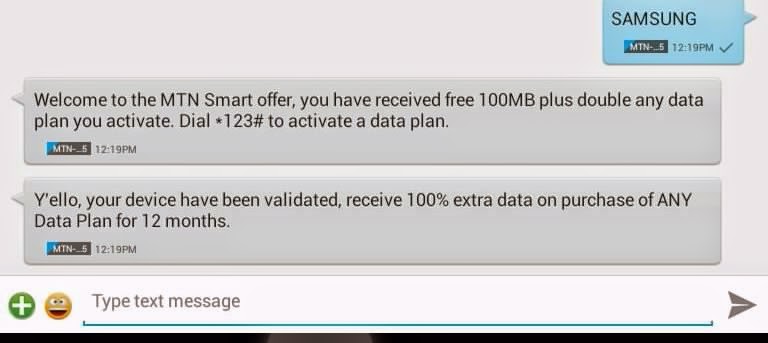
To get this done, we need the first 9 digits of a Samsung device's imei which is 359767053. Follow the same steps as above i.e the addition of 5 more digits and the use of Imei Analyzer to get the last digit. Then tweak the imei to your device by following this tutorial. you then send SAMSUNG to 131 to get the free 100MB

NOTE: you can repeat this steps till you get enough data that will last you for a month but please be considerate so others can benefit from it also.

How To Get Free 6 months WhatsApp Access on MTN


MTN 6 months free whatsapp

Finally, the same MTN offers us 6 Months free whatsapp access with the use of the imei 357360060. I assume you know what to do with these digits, complete it and tweak to your device then send FREE to 131 to be credited with your free 6 months whatsapp access.

Have you gotten yours? Let's know how many GB you were able to get from MTN.

www.CodeNirvana.in

Blogger Widgets
Related Posts Plugin for WordPress, Blogger...
try
Copyright © Technology Redefined | Owned By Jimoh Olajide Habeeb | Sitemap